Grok Bot vs Dots: Which is the better personal agent?
Good Morning,
This week amid mysterious tech outrages, the backdrop of the most important person in tech unable to return to his own company - Nvidia Earnings and Anthropic’s IPO, almost feel coincidental? The same week Google announced the era of AI autonomous attacks has arrived.
I wanted to continue our theme for the month of hands on applied AI guides. Our guest writer today has a Black Friday deal on his Newsletter, kindly check it out.
The AI Augmented Engineer
The AI-Augmented EngineerPractical guides on using AI to accelerate software development written by a staff software engineer. Deep dives on Claude Code, Codex, Cursor, and more.By Jeff MorhousThe Cursor team at SpaceX’s AI unit truly are outstanding. This to me what also makes Grok Bot vs. Anthropic’s Duet vs. OpenAI Dots a fairly interesting thing to watch for in 2027. Which one do you find yourself using the most?
It can’t be a coincidence that OpenAI is getting lawsuits over its cybersecurity breaking Astra-in-training and that this week first Microsoft, then the FAA, then the banks, and the NSA, and Apple iCloud all had issues, right? While Alibaba Qwen and OpenAI released new models, nobody seemed to notice. Google at the frontier, not quite. Jensanity indeed!
Anthropic is slated to list on the Nasdaq under the ticker symbol “ANT” and start trading on Nov. 19. How could a five year old go company in under half the usual time with this much revenue growth? Anthropic will turn just six on January 26th, 2027. Every model and product it launches, we have to pay attention to.
Is Anthropic a Product company in the late 2020s?
Claude seems to be about to spawn its own software-AI universe:
Claude Meetings
Claude Whiteboards, Sheets, etc…
Whatever Claude Duet can become is going to be pretty interesting.
We were just getting used to Claude Fable 5.2 after all.
The Generative AI Models has a good 2026
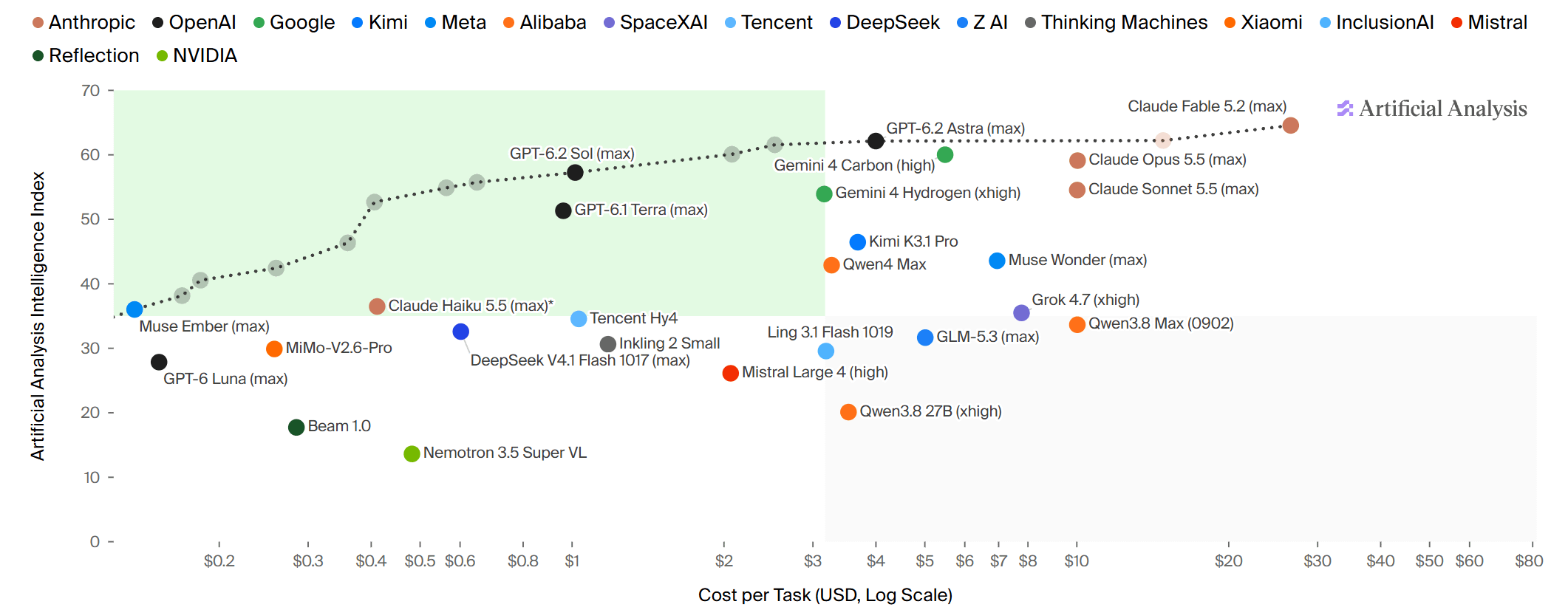
Nvidia still has more revenue in a single Quarter, nearly $116 Billion than Anthropic and OpenAI combined are likely to make in an entire year. Nvidia’s stock being down 36% since it’s all-time high is starting to become a big deal for the AI boom as AI stocks continue to enter correction territory.
Depending on what you want to use AI for, Grok Bot, OpenAI’s Dots, Meta’s Muse and Anthropic’s Duet all have their strong points. Jeff as a software engineer has quite a bit of experience with Grok Bot and Dots.
Grok Bot vs Dots: Which is the better personal agent?
By
There’s a lot of work in my life that doesn’t need my full attention but still manages to consume it. Checking whether someone replied. Finding the document for a meeting. Keeping track of the small commitments scattered across email, calendars, and project boards.
Personal agents are interesting because they can take responsibility for that work over time. Grok Bot and ChatGPT Dots both provide persistent agents with connected tools and cloud computers that can keep working after you close your laptop. Their differences become clearer when you decide what you actually want to delegate.
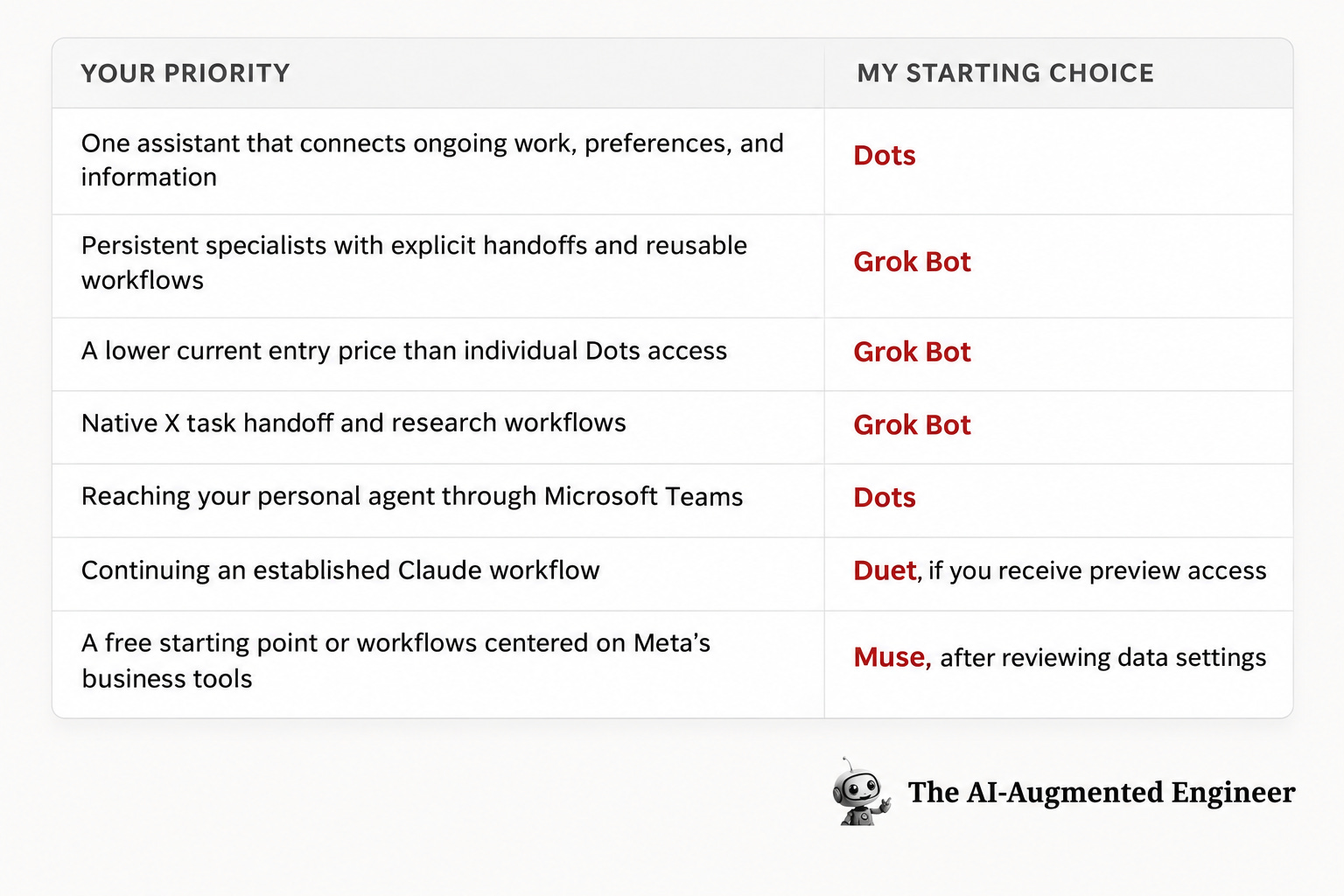
If you’re in a hurry, my recommendation is that you choose Dots if you want one personal assistant to connect the pieces of your work. Choose Grok Bot if you want to build explicit workflows around a team of persistent specialists.
[To access the full library of guides, upgrade].
Obviously the decision is complicated, so read on. We’ll cover Grok Bot’s recent usage cuts and current pricing, why it can use Claude, Dots’ nudges versus Grok’s routines, the difference between multiple Bots and one Dot, and the integrations that matter. We’ll also look at Claude Duet and Meta Muse, then what these tools mean for entrepreneurs and how I’d choose between them.
Grok Bot usage cuts
Grok Bot’s lower entry price is appealing. Its recent usage changes are a reminder to check how much work that subscription actually buys.
In early November, users reported abrupt jumps in their usage meters and unexpectedly exhausted allowances. TechRadar’s November 2 coverage quoted Elon Musk explaining that the cost of serving Grok Bot was “unsustainably high relative to revenue.” The discussion also included fluctuating meters, so those reports don’t establish one reliable percentage reduction for every subscriber.
For anyone planning to hand an agent recurring business work, the practical concern is predictable capacity. An assistant that handles your workflow comfortably one week and runs out of allowance the next needs a backup plan.
The entry price also depends on when you subscribed. The familiar $20 Grok Bot entry point refers to legacy Cursor Pro. New self-serve customers now enter through The X Subscription, where Grok Bot starts with Premium at $30 per month. Existing eligible legacy subscriptions continue to provide access.
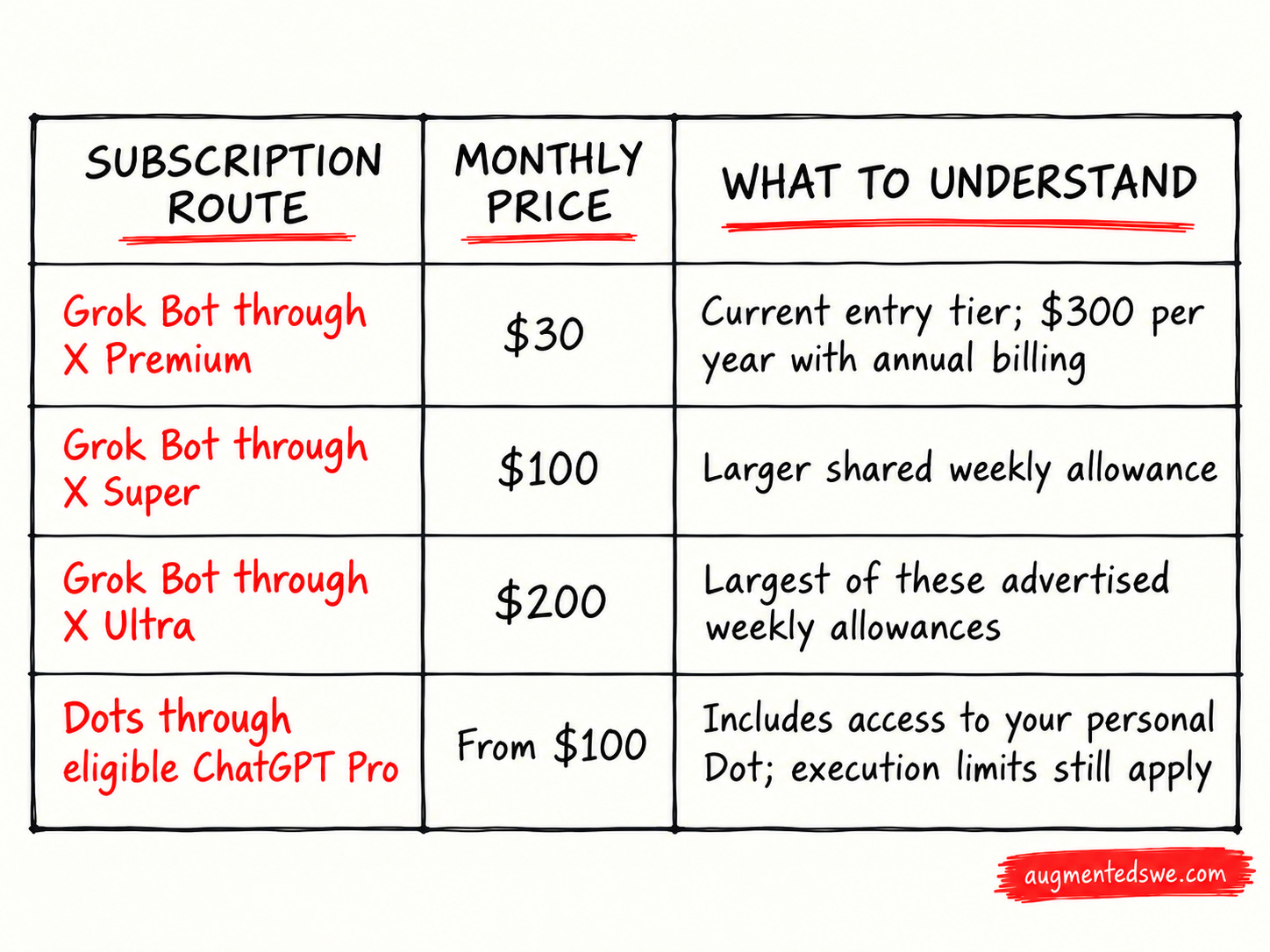
On the new X Subscription, Grok Bot shares a weekly usage pool with Grok and eligible Cursor usage. Extra work uses prepaid credits. Legacy Cursor accounts have different allowance and on-demand billing arrangements.
For eligible ChatGPT Pro and Business Premium accounts, conversations with your Dot don’t count against ChatGPT usage limits, but deeper work has an allowance, and delegated Work or Codex tasks consume those products’ usage.
My advice here is to compare useful completed work under the current allowance. A cheaper plan can be excellent value, but a subscription price alone tells you very little about whether it can sustain your workload.
What model does Grok Bot use? (Hint: It’s not Grok)
The name makes this surprisingly easy to misunderstand: Grok Bot is a product that can use multiple model providers.
Cursor’s current documentation explicitly discusses routing Grok Bot tasks to Claude Opus 5.5. It also says the backend can vary by request, there is no model picker, and users cannot request or block a particular model.
So if you’re using Grok Bot, you’re using a product/harness, but you don’t really know the underlying model.
Dots always use OpenAI models. OpenAI’s November 4 update says GPT-6.1 Terra is now one of the models powering it alongside GPT-6 Astra.
What matters is the whole agent system: how it gathers context, chooses tools, remembers your corrections, handles failures, and decides when to ask for help. A capable model can still be frustrating inside a product that loses context or repeatedly requires you to restart a workflow.
For company use, there is one concrete Grok detail to check: your Cursor team’s model allowlist or blocklist does not govern Grok Bot’s routing. This is a dealbreak for some enterprises, particularly in regulated industries, so it’s important to know upfront.
Dots has a related caveat: Enterprise model controls do not apply to its main conversation, although delegated Work and Codex tasks follow their respective products’ model controls. Check the agent’s own rules before assuming it inherits the restrictions you configured elsewhere.
I would choose between these products by running the same real task through them and reviewing the result. The product name and an underlying model’s benchmark score are only part of that decision.
Nudges from Dots vs Routines in Grok Bot
This is the most interesting difference, but it’s also easy to overstate. Both products can do work without a fresh prompt. The useful question is how you establish that ongoing responsibility.
Dots can surface work you haven’t explicitly scheduled
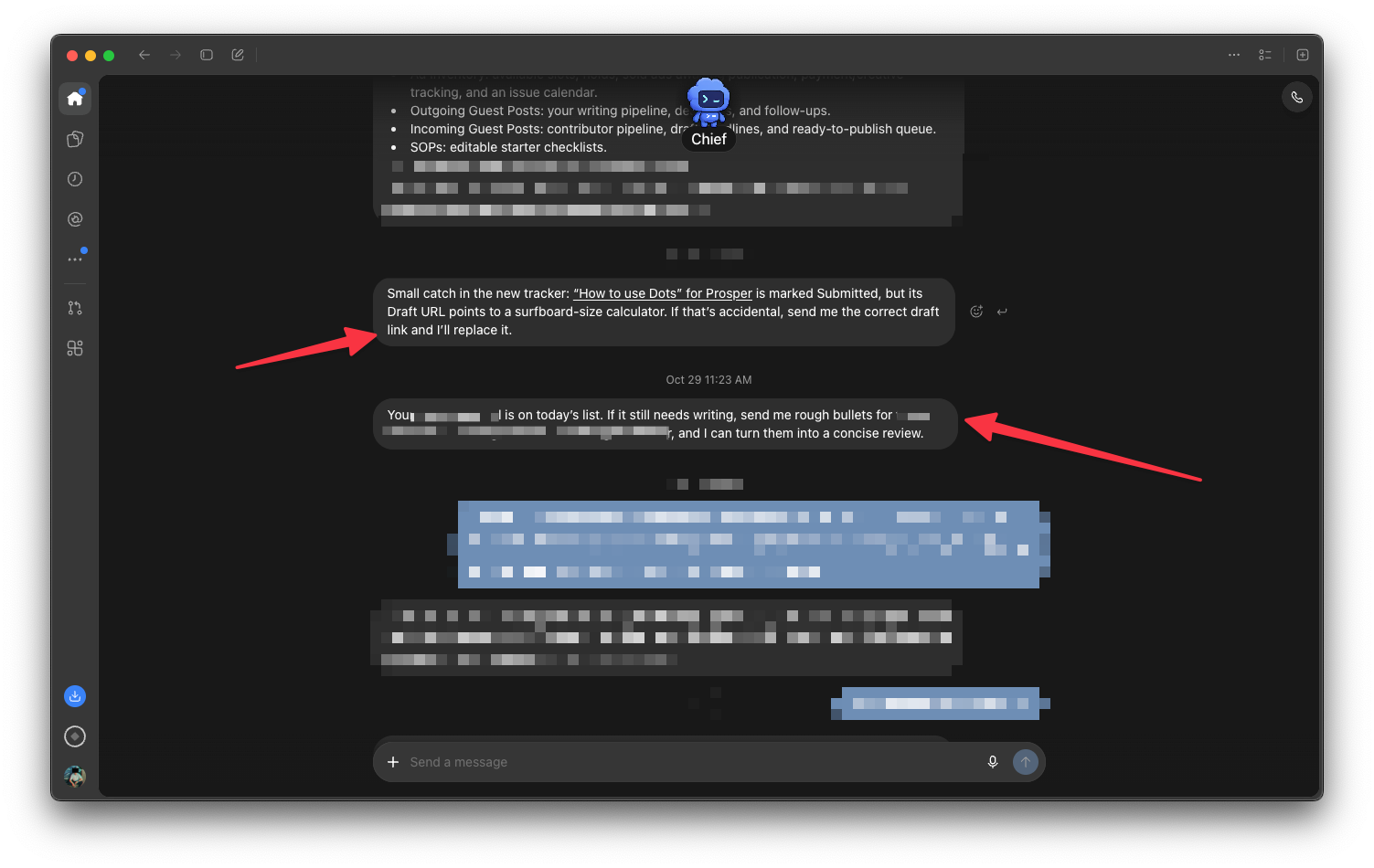
OpenAI calls one part of this proactive research. Your Dot can examine information it has permission to read, connect it to ongoing work, and keep private notes about useful findings. Those findings can become suggestions or questions for you.
Here’s 2 back-to-back instances of my Dot spotting something in shared context and offering to do work related!
Dots also starts with relevant context from ChatGPT memory and maintains its own notes about your preferences and ongoing work. Those notes are separate from ChatGPT’s saved memory. If you already use ChatGPT heavily, that can give Dots a practical head start.
Imagine you’re preparing a software launch. The date is on your calendar, the launch plan is in a document, and an email says a dependency has slipped. A useful nudge would connect those facts and explain which decision now needs your attention.
The appeal is that the agent can help identify a task you would otherwise have had to notice yourself.
It can also interrupt you at the wrong time or surface something you already know. I’d give it an explicit attention policy:
Focus on commitments I’ve made, deadlines within the next seven days, and questions blocking someone else. Bring me the source, what changed, and the decision you need. Batch everything else into a daily update.
The notification experience is becoming more convenient. On iOS, you can now reply to your Dot directly from a notification. That makes a quick decision possible without turning it into a full desktop session.
There’s an important boundary around the background research itself. Its tools cannot send messages, modify connected apps, or control a browser or computer. They report findings back to the Dot. Follow-up actions must satisfy the relevant permissions and approval rules. You can separately authorize recurring tasks to take actions within a defined scope.
For example, finding a missed deadline and drafting a follow-up are different responsibilities from sending that follow-up to a customer. Decide how much of that process you want to delegate.
Grok Bot makes a repeatable process explicit
Grok Bot organizes recurring work around two concepts: a skill records how to perform a task, and a routine tells a Bot when to perform it. Supported triggers include schedules, selected app events, incoming email, and webhooks.
Consider a weekly customer-feedback review. I’d first ask a Bot to gather recent feedback, group recurring problems, link the original reports, and produce a short engineering brief. I’d review one completed brief, correct its mistakes, and then ask it to save the agreed method as a skill.
Only after that would I automate it:
Every Friday at 9 AM Eastern, run the Customer Feedback Review skill against the sources we agreed on. Include only feedback received since the last successful review. Save a brief with evidence links and three recommended investigations. If a source is unavailable, identify the gap. Leave ticket creation and customer replies for my approval.
Grok also has a teaching feature! Where “Teach a task” is available, you can demonstrate a browser workflow and have it produce a draft skill. It records up to ten minutes of visible interaction. Review the generated instructions and add the exceptions your demonstration didn’t show before relying on them.
That is useful for a process you already understand, especially when explaining the interface would be more work than showing it.
A routine makes the trigger repeatable. The agent’s execution still needs evaluation. I would check the first few outputs, its behavior when there is no new data, and whether a retry creates duplicates.
Both products can schedule work and act proactively
Dots supports saved schedules and event monitoring where the connected service permits it. Grok’s primary Bot can check in on its own and coordinate other Bots. These capabilities overlap.
My preference is Dots when the difficult part is connecting scattered information and deciding what deserves attention. Grok Bot is especially appealing when I already know the process I want performed and want to teach, save, and assign it.
Watch the cost of that automation. Cursor warns that frequent schedules and broad Slack triggers can consume a weekly allowance in a day. A trigger on a specific event in one relevant channel is easier to evaluate and budget than a listener on every message in the workspace.
Many Grok Bots, one personal Dot
Grok Bot makes a roster of specialists a visible part of the product. Each Bot can keep its own conversation and working memory, and Bots can coordinate through direct handoffs or group chats containing two to six Bots. That group size is not a statement about the total number your account can have.
For a small software business, I could imagine this arrangement:
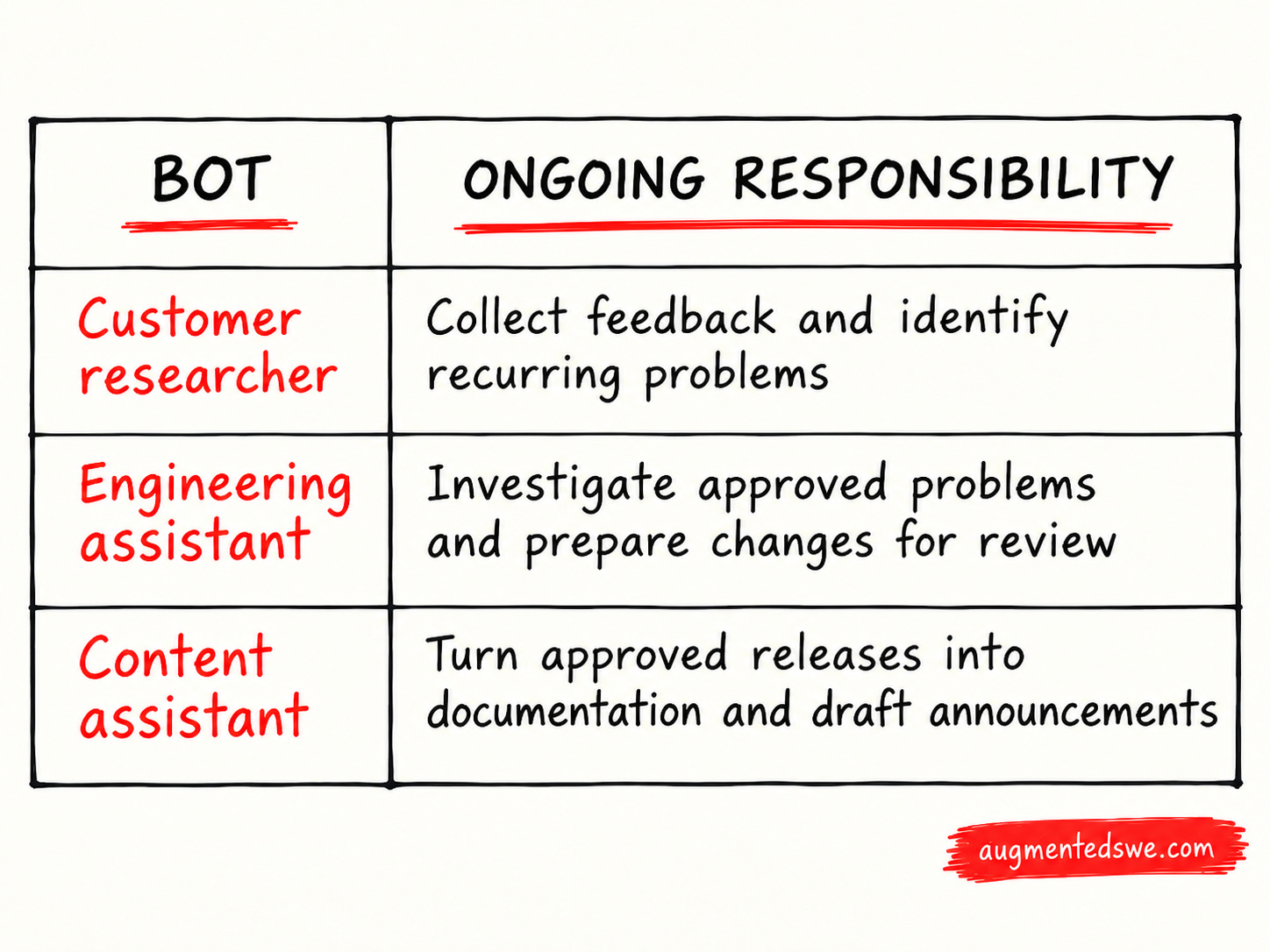
The value is continuity within each role. The content assistant can accumulate editorial preferences while the researcher maintains a clear definition of what counts as meaningful customer evidence.
Dots presents one personal assistant as your main point of contact. It can divide work among parallel background agents and delegate to visible Work or Codex threads, then review results and continue coordinating. One personal Dot does not mean one task at a time.
I’d give Grok the advantage for managing a visible team of persistent specialists. I wouldn’t automatically call it the winner at every form of multi-agent execution. Dots can handle parallel work while keeping the coordination behind one conversation.
Grok’s additional Bots also create overhead. Inter-Bot messages consume usage, and overlapping responsibilities can generate duplicate work. Start with one Bot that owns an outcome and add specialists when you can explain what each contributes.
Integrations unique to Grok Bot vs Dots
Grok Bot can search public X content without a connected X account. Personal information such as your home timeline, bookmarks, and DMs requires the X plugin and authentication. But the bad news is that the documentation also says that the plugin requires X API credits on your developer account (not cheap).
But there’s also a convenient entry point. You can tag @bot in an eligible X post or reply, and the request goes to your main Bot. X gets a short confirmation; the substantive work and results stay in the Grok Bot conversation. This handoff does not require the optional X plugin, but account linking and regional availability still apply.
For a developer educator like myself, a founder, or researcher who finds leads and product announcements on X, that removes some copying between tools. I’ve been using it to spin off research threads on topics that might be useful for The AI-Augmented Engineer. A useful request might be to investigate a release announcement, find its documentation, and add the verified changes to a research brief.
OpenAI documents Slack and Microsoft Teams as ways to reach your Dot. You continue with the same assistant and relevant context across those channels, although the message histories themselves remain separate.
That is a meaningful advantage if your workday already happens in Teams. An assistant is easier to use when you can give it a correction or answer a question where you already communicate.
These are native integration advantages, but each tool is quite capable of using tools that you work with in your everyday life.
Both can work beyond a connector catalog
Both products have cloud browsers and computers. Grok also documents adding custom MCP servers. Dots can use connected plugins and delegate coding work to a configured Codex environment. Cloud agents can continue work while your laptop is off, which is a huge unlock if your life has felt a lot like this:

What about Claude Duet?
Claude Duet is Anthropic’s entry into the category of personal agents. It is already a working research preview, with access through a waitlist for U.S. Pro, Max, and Ultra subscribers. Team and Enterprise access is not available yet. It’s hard to run a proper comparison of Duet to Grok Bot or Dots until the tool is generally available.
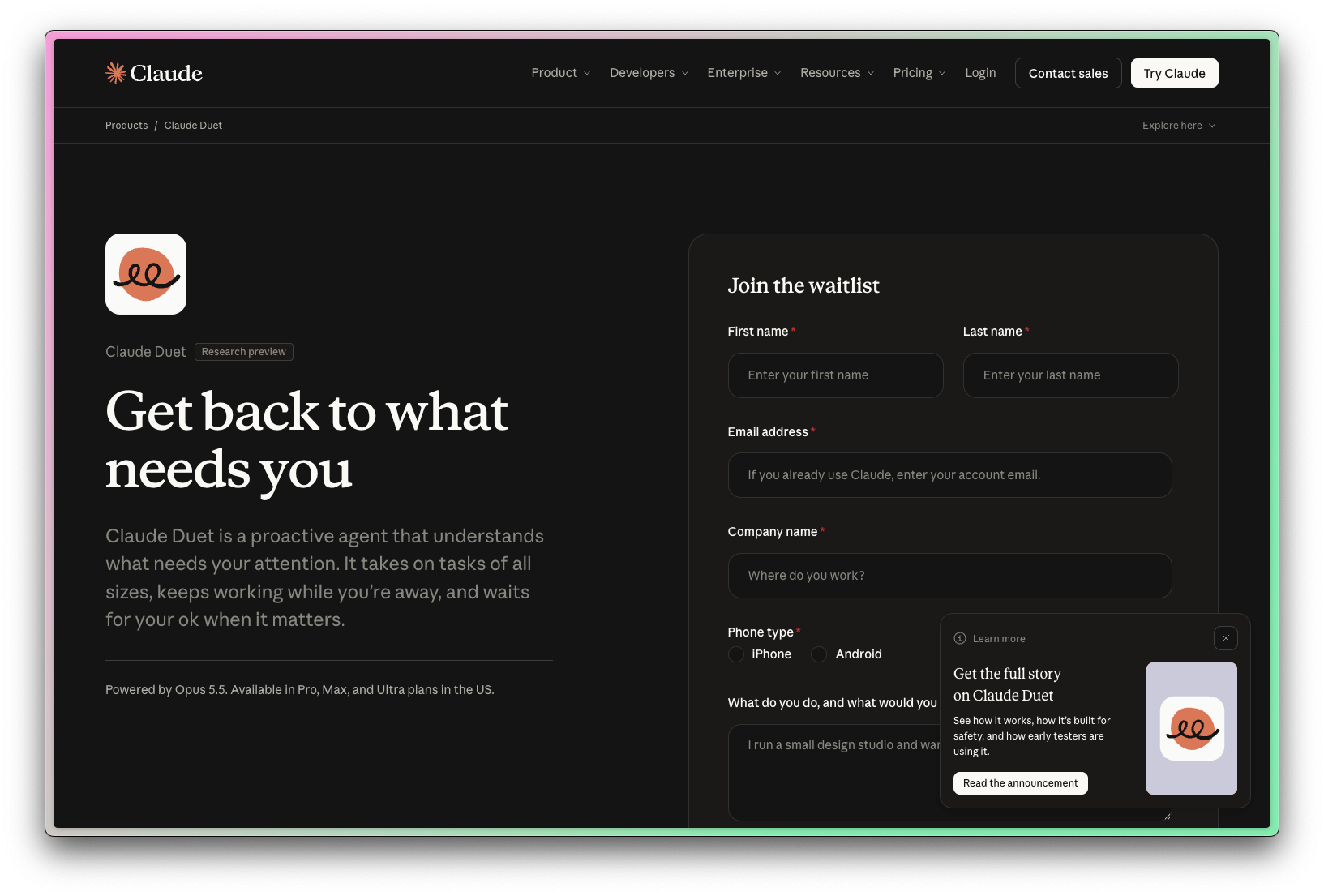
Its design looks closer to Dots’ personal-assistant approach. You have one continuing relationship, context from your existing Claude account, proactive updates, and background execution. Anthropic describes a morning brief drawn from connected apps, followed by updates when something needs attention. It can also produce larger deliverables such as research briefs, dashboards, and prototypes.
Duet currently runs on Claude Opus 5.5 without a model picker. During the preview it has no additional subscription charge, but its work consumes your existing Claude allowance.
There are practical preview limitations. Microsoft 365 is not available, some Slack functionality is limited, and users cannot currently watch or take over Duet’s cloud browser. It checks accounts at intervals, so I would not rely on it as an immediate alerting system.
If you already do substantial work in Claude, Duet is worth watching because existing memory, skills, and connectors carry over. That could make onboarding easier than rebuilding your working context elsewhere.
My recommendation is to join the waitlist (I’ve been on it for weeks) if that continuity appeals to you, while choosing an available product for work you want to delegate now. Promising preview features are useful information, but they don’t establish that Duet will outperform Grok Bot or Dots on your tasks
What about Muse?

Meta’s Muse deserves consideration, particularly for personal administration and small businesses. It is available to adults in the U.S. and Canada, and Meta offers a free tier with usage limits, a $20/month Power plan, and a $100/month Maximum plan. muse.ai
Muse runs on its own cloud computer and supports interaction through its app and WhatsApp. It launched on Meta’s Muse Spark model. Meta has since announced Muse Wonder, with a subscriber-first rollout planned for the personal agent. Its availability in the Meta Model API or Muse Code should not be confused with availability in every Muse account. about.fb.com
Its business integrations are particularly relevant to entrepreneurs. Meta lists services such as Shopify, Stripe, QuickBooks, Notion, and Slack, alongside Facebook, Instagram, and Meta ads. If those tools already run much of your business, Muse belongs on your shortlist. muse.ai
I see it competing most directly with the general personal-assistant side of Dots. Muse keeps context across conversations, continues work in the background, and lets you ask for more or fewer proactive suggestions. Its low entry cost makes it accessible to someone who wants help with everyday work before committing to a larger subscription.
The privacy questions
I personally scrutinize Muse’s data privacy, and am not excited to connect Muse to incredible amounts of personal data.
Meta says conversations and execution traces can be used for model training after sanitization, with an opt-out in Muse settings. It says conversations and data from its virtual machine (VM) are not directly shared with its advertising systems, although activity carried out on connected websites can indirectly influence advertising.
The current Secure VM also does not prevent Meta from accessing data when needed to operate, secure, or support the service. Meta describes a more restrictive Confidential VM as a future capability undergoing testing. Those are different privacy promises.
There is a recent product-specific example, too. In October, researchers found that user-created shared Muse conversations could be discovered through their public hostnames. After the issue was reported, Meta suspended the sharing feature, and the researchers’ previously accessible sample stopped opening. This concerned shared links, not evidence that every private conversation was exposed
Muse may still be the right fit for you, but I’d make that decision with a clear understanding of training settings, sharing behavior, and which information you’re comfortable connecting. The same questions belong in an evaluation of the other agents, too.
The impact of personal agents on entrepreneurs
Personal agents make a one-person business more practical by reducing the administrative work that competes with its core work. I’ve seen this firsthand as a software engineer using coding agents like Claude Code to accelerate my work.
For a software founder, that might mean collecting feedback, preparing customer context, drafting documentation, and following up on outstanding decisions. For a newsletter business, it might mean tracking sponsor deadlines, organizing research, preparing interview briefs, and turning approved articles into draft social posts. I’m using Dots in my own newsletter work to help me focus on long-form content and automate distribution.
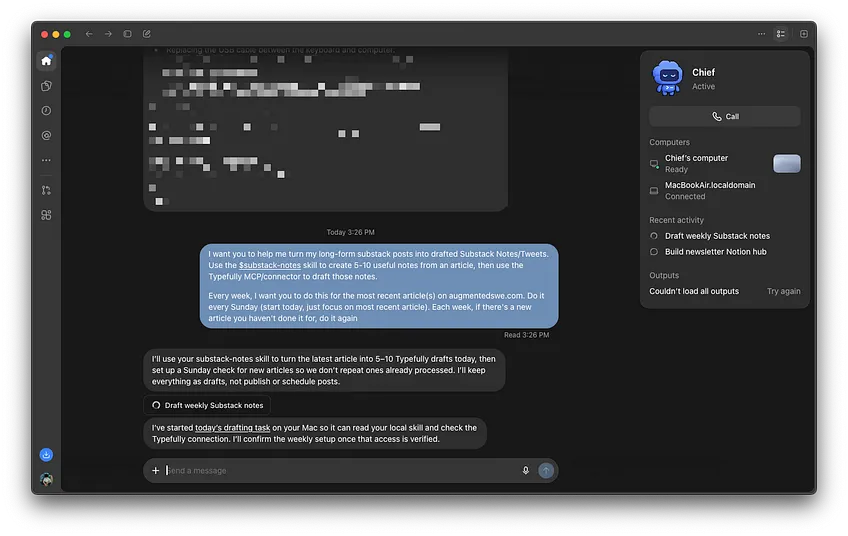
Those jobs are individually manageable. The accumulation is what fragments your day.
There’s a familiar idea here from Tim Ferriss’s The 4-Hour Workweek: delegate repeatable work to an assistant and make your decision rules explicit. Ferriss’s own account of outsourcing his inbox describes written processing rules, recurring check-ins, and escalation of the decisions that needed him.
Personal agents make that approach easier to experiment with. You still have to learn how to delegate well.
“Help run my business” leaves too much undefined. “Each Monday, identify sponsor placements missing approved copy and prepare follow-up drafts” gives the agent a source, a decision rule, and a useful deliverable.
I would start with a responsibility that is recurring, consumes attention, and produces something easy to inspect. Then make three things explicit: what good output looks like, when it should interrupt you, and which actions it may take without another decision.
For the sponsor example, I’d want a short list containing the placement date, missing material, source correspondence, and proposed next step. I’d keep the publishing calendar as the source of truth and have the agent prepare the work around it.
The measure that matters is time returned after supervision. If an agent saves 30 minutes but requires 25 minutes of corrections, the workflow needs improvement. If a $100 monthly subscription returns four hours after review and maintenance, that is $25 per hour returned. That’s a simple hypothetical calculation, but it’s more useful than counting how many tasks the agent says it completed.
Protect some of that recovered time for deep work. An assistant that creates a constant stream of interesting suggestions can become another inbox. Tell it to batch routine findings and bring you only the decisions that deserve an interruption.
The opportunity is to spend more of your day building the product, talking to customers, or writing the work people pay you for, with fewer small obligations competing for your attention.
Which agent to choose?
If you want one assistant that connects your ongoing work, preferences, and information, I’d start with Dots. This is especially true if you already subscribe to ChatGPT/Codex It’s also my starting choice if you want to reach your personal agent through Microsoft Teams.
If you want persistent specialists with explicit handoffs and reusable workflows, I’d start with Grok Bot. I’d also choose it if you’re looking for a lower current entry price than individual Dots access, or if native X task handoffs and research workflows are a priority.
If you already have an established Claude workflow and want to continue it, I’d consider Duet, provided you receive preview access. In fact, if you pay for a Claude account, go ahead and request access!
If you want a free starting point or your workflows center on Meta’s business tools, I’d start with Muse, after reviewing its data settings.
My default remains Dots for a personal coordinator, Grok Bot for a deliberately organized team of specialists. But the best choice is the one that can reliably take a real obligation off your mind at a cost you’re happy to keep paying.
Brief bio for Jeff Morhous
Jeff is a Staff Software Engineer who uses AI to accelerate his work. He writes The AI-Augmented Engineer to teach people how to use AI to write better code, ship faster, and level up their careers. He writes weekly deep guides on using tools like Claude Code, Cursor, Codex, and more to build awesome apps.